
The New Load Balancer: Tracking LLM Costs with an AI Gateway!
Why?
Tracking AI usage is HARD. Especially when you use different providers — Bedrock, Anthropic, OpenAI. And you often need different ones, because each has unique traits: data protection and compliance, cost, latency, model availability.
At the start, the problem is minimal. If your total AI bill is less than 1% of your infrastructure cost, nobody asks questions. But when it starts consuming 50% of your production infrastructure costs, questions appear very quickly:
- WHICH application costs that much?
- WHICH model is the most expensive one?
- Can we switch some of the apps to cheaper models?
And to answer any of those questions you need... more AI. Just kidding. You need observability.
And here comes the story as old as programming itself — first we discover the problem, then solutions emerge to solve it. After cloud providers started adding LLM capabilities, platforms emerged that aggregate all LLM traffic into a single place:
- OpenRouter (SaaS)
- Cloudflare AI Gateway
- LiteLLM (open source / SaaS)
- vLLM (open source)
- Bifrost (open source / SaaS)
- ...and many more — rosną jak grzyby po deszczu (they grow like mushrooms after rain, as we say in Poland)
The bold phrase
Let me state it: "The AI Gateway will be (or already is) the same crucial piece of infrastructure as the Load Balancer is today."

And it matters at different levels, for different groups of people:
Developers:
- see cost, token usage, and latency for their LLM calls
DevOps:
- see model and provider usage across the company, total cost, provider availability and error rates
Management:
- see the total cost of LLM usage in the company
Security:
- see which providers are used and whether applications processing PII with LLMs use a compliant provider
- apply governance rules at the Gateway to quickly filter/catch compliance-violating requests
Case Study
#1: WHO spends WHAT on Bedrock?
One of our partners reached the level where nearly 25% of production AWS costs came from Bedrock. Multiple apps used the AWS Bedrock API, but on the AWS Cost Explorer dashboard you can only see which model costs how much — not which application.
So we introduced Bifrost (OSS) as the AI Gateway layer. All Bedrock LLM traffic must go through it — only Bifrost has permissions to AWS Bedrock. This makes Bifrost the single source of truth for LLM access and cost usage.
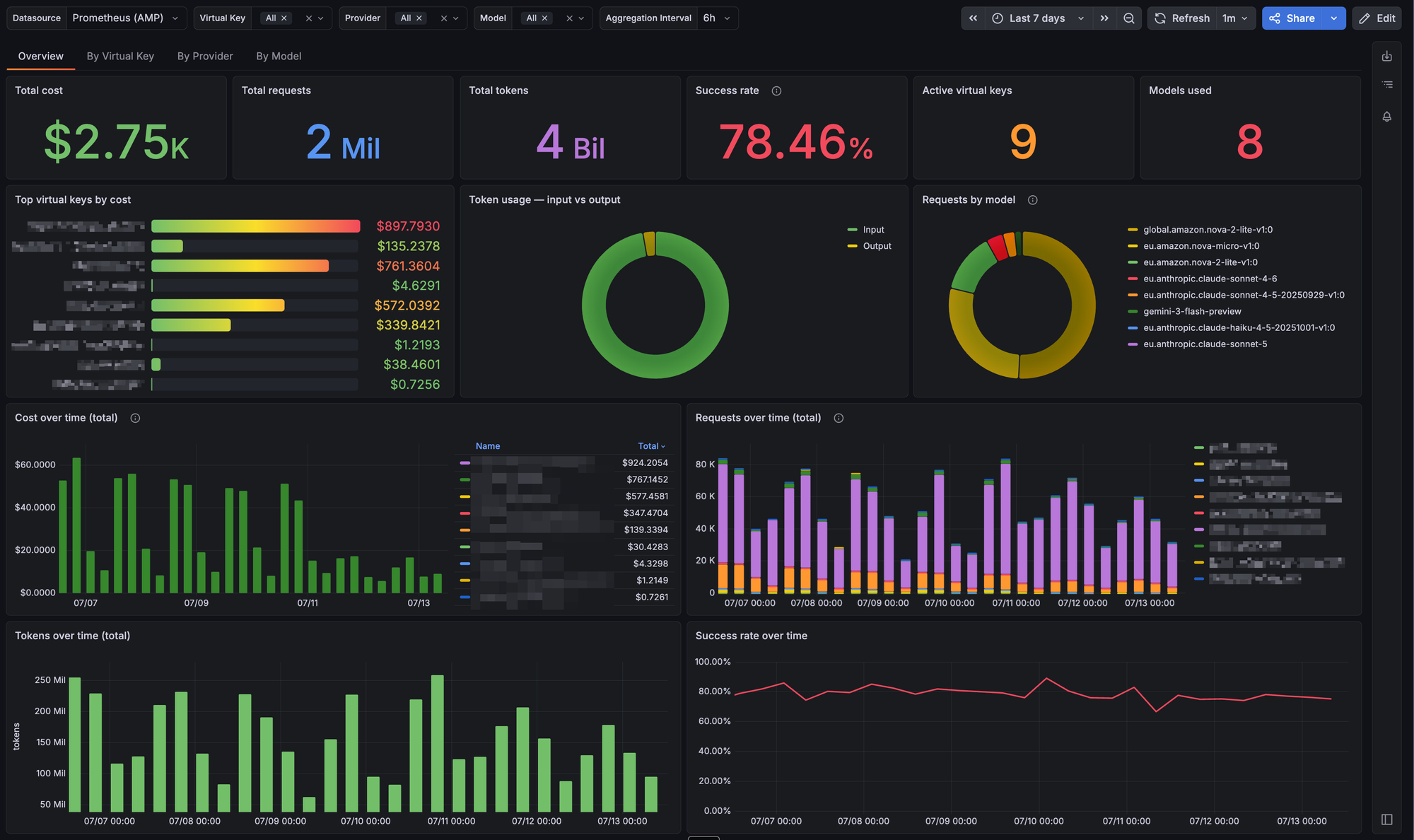
With all teams switched over, we used the Bifrost Prometheus Exporter to track per-application metrics: model usage and cost. So now we can:
- see how much each application spends...
- on which provider...
- and on which model
- specify monthly budgets (useful for CI)
Virtual Keys via Terraform
How do teams request a Virtual Key for their app? We've prepared and open-sourced the Bifrost Terraform Provider that exposes the Virtual Key as a resource.
We wrapped it in a module that creates:
- a Bifrost Virtual Key
- an SSM Parameter Store entry —
AI_GATEWAY_API_KEYwith the VK value - an SSM Parameter Store entry —
AI_GATEWAY_BASE_URLwith the SDK-ready URL, likehttps://bifrost.example.com/openai
module "app_virtual_key" {
  source         = "s3::https://XXX/v0.3.0.zip"
  bifrost_host   = var.bifrost_host
  environment    = var.environment
  application    = "app"
  compatible_api = "anthropic"

  budget = {
    monthly = {
      amount = 100
    }
  }
}
Wait, doesn't AWS have this built-in?
Sort of. AWS Bedrock introduced Application Inference Profiles that can track costs per app, but with a big limitation — one inference profile is tightly coupled with exactly one model.
So with 20 applications and 4 models each, you'd need to create 80 Application Inference Profiles. And IAM permissions to use them...
Also, in an emergency when you need to switch to a different model (scenario for that below), you'd first have to prepare new Application Inference Profiles and only then switch the model in the app — otherwise you lose cost tracking.
One more caveat: the feature was introduced in 2024, but for a long time it wasn't available via Terraform — and not even from the web UI. AWS added UI support to view Application Inference Profiles in 2026, two years after the initial release.
ℹ️ Read more in the official AWS post: Track, allocate, and manage your generative AI cost and usage with Amazon Bedrock
#2: Latency spike?
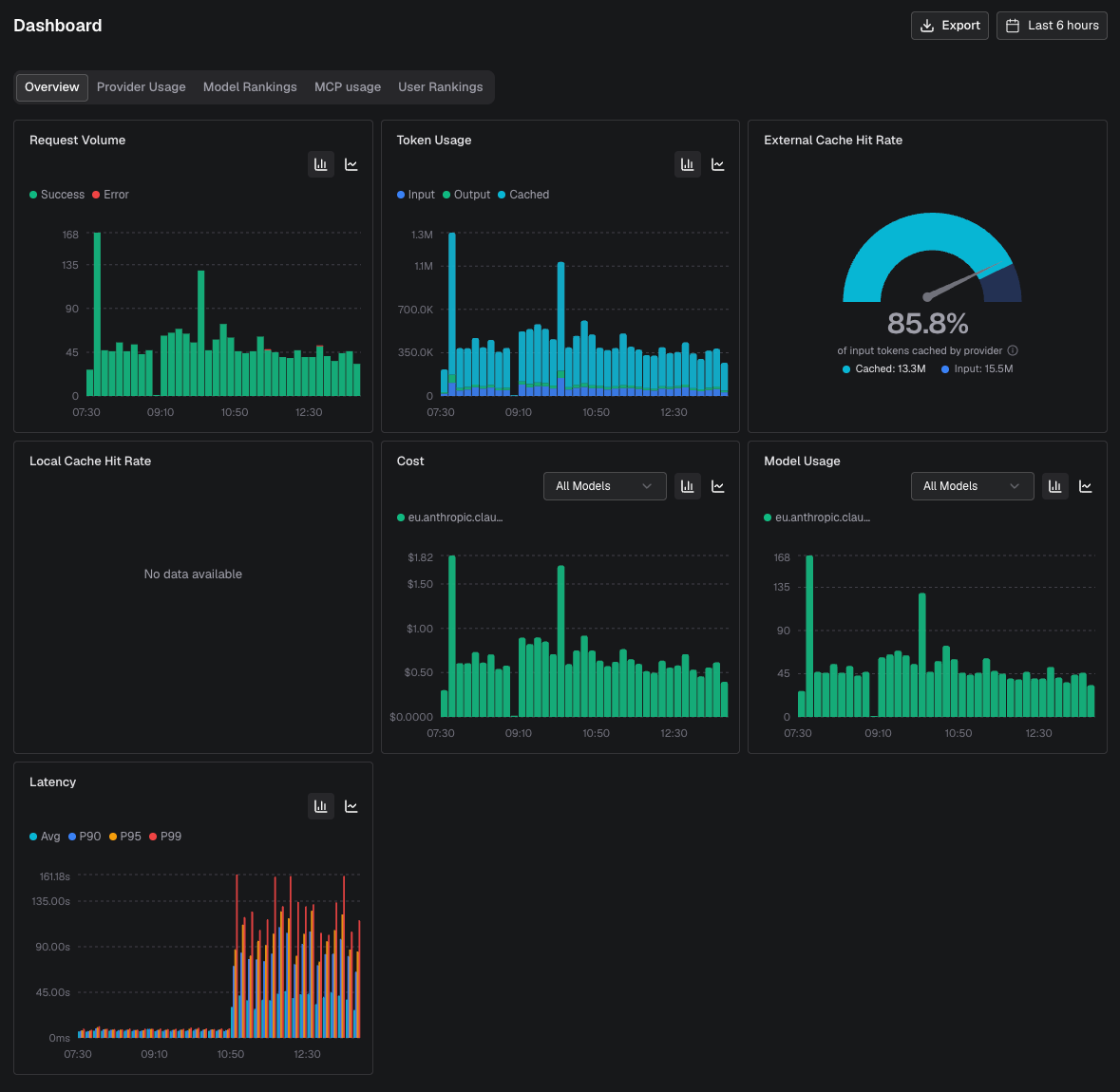
Another day, another ticket. A team reported that messages were stacking up in a queue — LLM responses suddenly took 2–3 minutes instead of the usual few seconds.

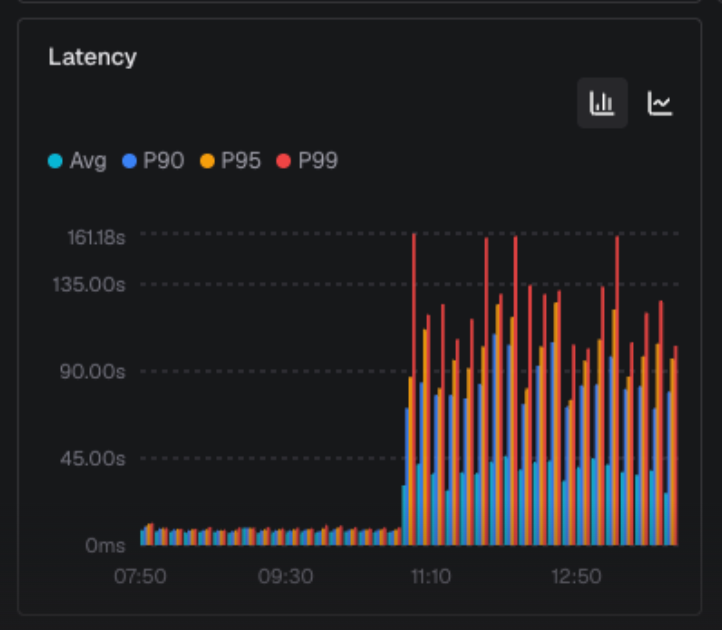
We quickly confirmed the latencies via the Bifrost UI, where you can inspect latencies per provider and per model for LLM sessions:
For sonnet-4-5 we saw the following latencies:
But for sonnet-4-6:
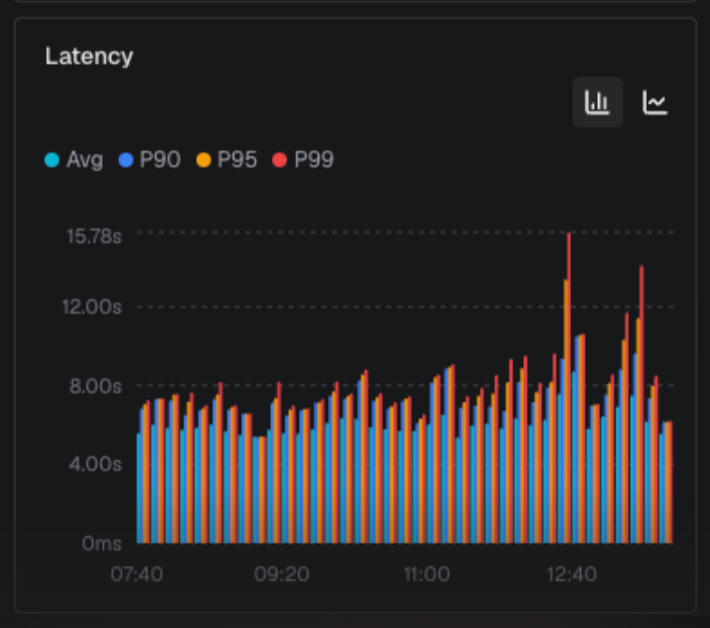
⚠️ Only a single model had latency issues on AWS Bedrock. We advised the team to switch to sonnet-4-6, and after the switch the issue was resolved and number of messages in the queue started to drop:
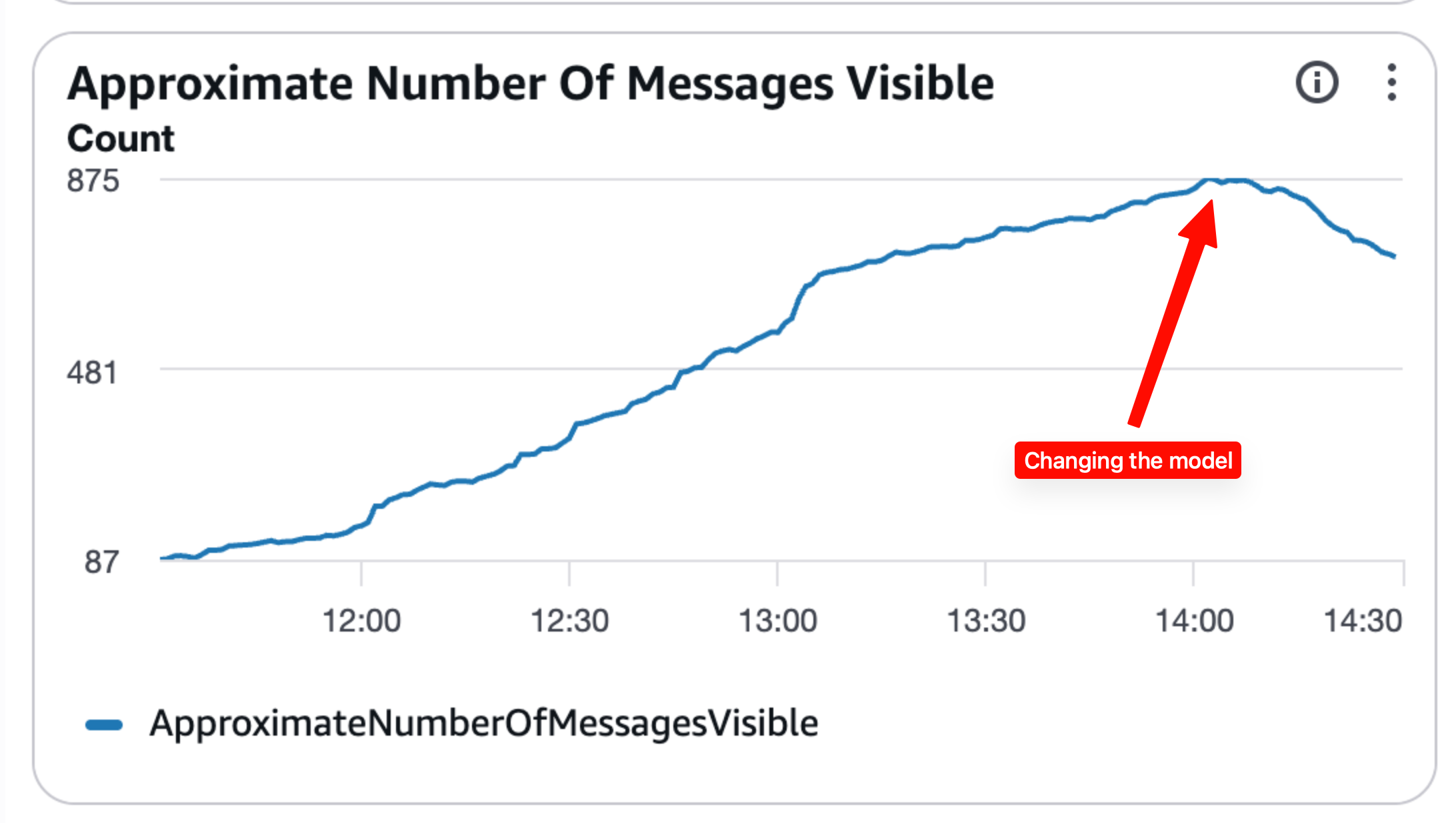
No AWS support ticket, no guessing — the gateway had the answer in minutes.
There is more!
Model aliases
Currently our teams use raw Bedrock model IDs for inference, like eu.anthropic.claude-opus-4-5-20251101-v1:0. We plan to prepare aliases like bedrock/claude-opus-4-5, so nobody has to worry about inference profiles or picking the proper model version by date.
Model routing
Bifrost has a very flexible model routing system. It can route traffic to cheaper models when a budget is exceeded, or configure fallback routing when a provider is failing — remember Case Study #2? With fallback routing configured, that switch could have happened automatically.
Learn more
- Bifrost on GitHub
- AWS: Track, allocate, and manage your generative AI cost and usage with Amazon Bedrock